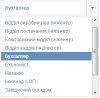
Теперь более интересная фишка:
Стилизация блоков Select. Решил я данную проблему в виде jQuery плагина, код которого выглядит так:
/*-------------------------------------------------------------------*/
/* SelectBar */
/*-------------------------------------------------------------------*/

(function($){
  jQuery.fn.selectbar = function(){

    var e, oisSbTimer, oisElement;

/*-------------------------------------------------------------------*/

    var handler = function(){
        e = $(this);
        if(e.attr('multiple'))
        {
            e.multiselect();
            return true;
        }

        i = 1;
        e.hide().find('option').each(function(){ $(this).attr('oid', i); ++i; });

        var selected = e.find('option:selected').attr('selected', 'selected').html();
        var name = e.attr('name');

        $('<section></section>').html('<span class="selected">' + selected + '</span>').attr('id', 'opb-' + name).addClass('ois-selectbar').insertAfter(e);
        oisElement = $('#opb-' + name);

        $('<section></section>').addClass('ois-variants').appendTo(oisElement);

        e.find('option').each(function(){
            $('<a></a>').html($(this).html()).attr('oid', $(this).attr('oid')).appendTo(oisElement.find('section.ois-variants'));
            if($(this).attr('selected'))
                oisElement.find('a[oid=' + $(this).attr('oid') + ']').addClass('selected');
        });

        e.live('change', function(){ setSelected($(this).find('option:selected').attr('oid')); });

        oisElement.width(oisElement.find('section.ois-variants').width() - 20);
        oisElement.find('section.ois-variants').css('width', '100%');

        oisElement.bind('click', function(){ toggleVars(); return false; });
        $('#opb-' + name + ' section.ois-variants a').bind('click', function(){ setSelected($(this).attr('oid')); return false; });
        $('body').bind('click', function(){ toggleVars(true); });

        oisElement.bind({
            mouseleave: function(){
                if($(this).find('section.ois-variants').hasClass('showed'))
                    oisSbTimer = setTimeout(function(){ toggleVars(true); }, 3000);
            },
            mouseover: function(){ clearTimeout(oisSbTimer); }
        });
    }

/*-------------------------------------------------------------------*/

    var toggleVars = function(f){
        if(!f)  oisElement.toggleClass('ois-opened').find('section.ois-variants').toggleClass('showed').fadeToggle(150);
        else    oisElement.removeClass('ois-opened').find('section.ois-variants').removeClass('showed').fadeOut(150);
    }

/*-------------------------------------------------------------------*/

    var setSelected = function(oid){
        var text = oisElement.find('section.ois-variants a').removeClass('selected').parent().find('a[oid=' + oid + ']').addClass('selected').text();

        oisElement.find('span.selected').html(text);
        !oisElement.find('section.ois-variants').hasClass('showed') || toggleVars();
        e.find('option').removeAttr('selected').parent().find('option[oid=' + oid + ']').attr('selected', 'selected');
    }

/*-------------------------------------------------------------------*/

    return this.each(handler);
  }
})(jQuery);
Мой CSS выглядит таким образом:
/* Контейнер */
.ois-selectbar{
  background: #fff;
  border: 1px solid #d6dfe8;
  color: #8195c1;
  cursor: pointer;
  font-family: Helvetica;
  font-size: 8pt;
  font-weight: bold;
  display: inline-block;
  margin-left: 2px;
  padding: 5px 7px 4px 7px;
  position: relative;
  min-width: 70px;
  width: 100%;
  z-index: 2;
}

/* Стрелочка справа */
.ois-selectbar:after{
  background: url('images/b_arrow.png') no-repeat center center;
  content: '';
  position: absolute;
  top: 0; right: 0;
  width: 20px; height: 23px;
}

/* Изменение вида стрелочки при наведении на блок */
.ois-selectbar:hover:after, .oi-selectbar.oi-opened:after{ background-color: #f3f5ff; border-left: 1px solid #d5d8ff; }

/* Блок с вариантами выбора */
.ois-variants{
  background: #fff;
  border: 1px solid #d6dfe8;
  display: none;
  font-weight: normal;
  max-height: 200px;
  overflow-y: auto; overflow-x: hidden;
  position: absolute;
  top: 110%; left: -1px;
}

/* Каждый отдльный вариант */
.ois-variants a{
  display: block;
  padding: 3px 10px;
  text-decoration: none;
}

/* Каждый отдельный вариант при наведенном курсоре */
.ois-variants a:hover{ background: #eef; }

/* Выбранный вариант */
.ois-variants a.selected{
  background: #637bad;
  color: #fff;
  font-weight: bold;
  margin: 0 -1px;
}
Теперь чтобы стилизировать все Selectbar'ы просто пропишите следующий JS код:
$('select').selectbar();Стоит отметить, что при отключенном JS вы увидите обычный Select, то есть данный плагин я писал так, чтобы он не создавал новый Select, а создавал отдельный стилизированый селектбар, связанный с существующим.
.gif)
Результат на скриншоте.